

Clean Suite for CRM: Salesforce Reference Guide#
Global Address Validation#
Single Record Processing#
Global Address Validation processes one Salesforce record through MD_GlobalAddressWSExt.
Introduction#
The package reads the input fields from a globalAddress Custom Mapping.
It sends the package JSON envelope to Melissa.
It saves the response in MD_globalAddressResult__c and applies configured output mappings.
See Package Request Envelope for the actual request format.
How to use Lightning Quick Action#
Before you use the action, add the package action to the active record page layout.
Open a record that has a Global Address Custom Mapping.
Start the configured Global Address quick action.
Wait for the package to process the record.
Review the configured output fields or
MD_globalAddressResult__c.
Apex Use#
Use the synchronous method for one record.
String outcome = MDPERSONATOR.MD_GlobalAddressWSExt.doGlobalAddress(recordId);
The method returns Success after processing.
It does not return Melissa result codes.
Read the configured result-code output field or MD_globalAddressResult__c.Results__c for the result codes.
Trigger Use#
Call doOneGlobalAddress(recordId) from trigger logic when the callout must run asynchronously.
The method has @Future(callout=true) and returns no value.
Official Service Reference#
See Melissa Global Address Verification documentation for service behavior and result codes.
Batch Processing#
Clean Suite Batch Processing validates address data across large datasets asynchronously using Apex batch jobs.
Introduction#
Batch processing uses MD_GlobalBatch to process thousands of Salesforce records. The batch engine reads a SOQL query and groups records into batches of 100. It sends requests to Melissa Global Address services. It then writes standardized address fields and result codes to Salesforce records.
Batch Job Flow#
This flow shows how the batch job processes address records.

Diagram flow
SOQL query → Matching Salesforce records
Matching Salesforce records → Batches of 100 records
Batches of 100 records → MD_GlobalBatch
MD_GlobalBatch → Melissa Global Address service
Melissa Global Address service → Standardized fields and result codes
Standardized fields and result codes → Salesforce records
How to use the Clean Suite Batch interface#
Follow these steps to launch a batch job from the user interface:
Open the Clean Suite app from the App Launcher.
Click the Clean Suite Batch tab.
Select Global Address from the Engine dropdown list.
Select the target Salesforce Object (for example Contact or Lead).
Select an active Field Mapping.
(Optional) Enter a custom SOQL WHERE clause to filter records (for example
MailingPostalCode = NULL).Click Run Batch.
Monitor progress under Setup → Async Apex Jobs.
Advanced Batch Processing#
Exposed Methods#
Invoke batch jobs programmatically using MD_CleanSuiteBatchController:
public static Id executeBatchJob(
String Engine,              // 'MD_GlobalBatch'
String BatchObject,         // 'Contact', 'Lead', or custom object name
String Query,               // Full SOQL query string if CustomQuery is true
String Mapping,             // Custom mapping record Name
Boolean RecordUpdate,       // true to update target records with address results
Boolean ProcessAll,         // true to process all records regardless of prior verification
Boolean CustomQuery,        // true to use custom SOQL query
String SmartMoverListName,  // Unused for Global Address (pass empty string)
String SmartMoverJobId      // Unused for Global Address (pass empty string)
)
Sample Code#
Use this Apex code to launch a Global Address batch job from an admin script or Apex trigger:
// Define batch parameter values
String engine = 'MD_GlobalBatch';
String targetObject = 'Contact';
String customQuery = 'SELECT Id FROM Contact WHERE MailingCountry = \'US\' AND Clean_Suite_Global_Address_Result__c = NULL';
String mappingName = 'Contact Global Address Mapping';
Boolean updateRecords = true;
Boolean processAll = false;
Boolean isCustomQuery = true;

// Execute batch job
Id jobId = MDPERSONATOR.MD_CleanSuiteBatchController.executeBatchJob(
    engine,
    targetObject,
    customQuery,
    mappingName,
    updateRecords,
    processAll,
    isCustomQuery,
    '',
    ''
);
Best Practices#
Limit Batch Scope: Pass a SOQL WHERE clause to target unverified records only. This reduces API credit usage.
Batch Size Limit: Keep batch size at 100 records per chunk to match Melissa service payload limits.
Avoid Concurrent Batches: Do not run two Global Address batch jobs on the same object at the same time. Concurrent jobs can cause record lock conflicts.
Admin Configuration#
The package reads these configuration options from the latest MD_suiteSetting__c record named webServiceOptions.
These options control address validation output and behavior.
UI Label |
API Field |
Allowed Values |
Default |
Effect |
|---|---|---|---|---|
Country of Origin |
countryOfOrigin__c |
All ISO country codes (US, GB, CA, etc.) |
US |
Sets geographic context for address validation and output locale. |
Output Script |
outputScript__c |
NOCHANGE, NATIVE, LATN |
NOCHANGE |
Controls character set conversion in output. NATIVE preserves the native script. LATN converts to Latin transliteration. |
Geocode |
geocode__c |
GEOOFF, GEOON |
GEOON |
When GEOON, the service returns geocoordinates. When GEOOFF, geocoding is disabled. |
Delivery Lines |
gavDeliveryLines__c |
On, Off |
Off |
When on, includes delivery point information in results. |
Include Remnant |
gavIncludeRemnant__c |
On, Off |
On |
When on, includes remnant address lines (fragments that do not match known data). |
Detailed Results |
gavDetailedResults__c |
On, Off |
Off |
When on, returns extended result detail in output. |
Area Details |
gavAreaDetails__c |
On, Off |
Off |
When on, includes area-specific demographic and geographic details. |
US Extras (Census, County, School) |
gavUSExtras__c |
On, Off |
Off |
When on, appends US census tract, county, and school district codes to results. |
US Preferred City Names |
gavUSPreferredCityNames__c |
On, Off |
Off |
When on, the service returns USPS preferred city names instead of standard names. |
Melissa City Keys |
gavMelissaCityKeys__c |
On, Off |
Off |
When on, includes Melissa Data proprietary city key identifier. |
GB Extras (UPRN) |
gavGBExtras__c |
On, Off |
Off |
When on, UK addresses include Unique Property Reference Number (UPRN). |
Extended Date/Time (UTC, DST) |
gavExtendedDateTime__c |
On, Off |
Off |
When on, the service returns UTC and daylight saving time information with geocoding results. |
US Standardization Type |
gavUSStandardizationType__c |
Short, Long, Auto |
Short |
Controls US address format in output. Short represents two-letter state abbreviation. Long represents full state name. Auto lets the system decide based on address. |
Line Separator |
gavLineSeparator__c |
SEMICOLON, PIPE, CR, LF, CRLF, TAB, BR |
SEMICOLON |
Specifies character used to separate multi-line address components in output. |
Address Update Codes |
globalVerifyLevel__c |
Regex pattern strings (e.g., AV2[45]) |
AV2[45] |
Specifies which Global Address result codes trigger record updates. |
Result Codes#
Global Address Validation returns record-level codes for each verified address and service-level codes for request errors or warnings.
For all Global Address Validation result codes, see Result Codes - Global Address Verification.
For the complete result-code reference, roadmap, and result-code routing guidance, see Result Codes.
Engineering Reference#
Exposed Methods#
MD_GlobalAddressWSExt.doGlobalAddress(Id recordId)#
Item |
Value |
|---|---|
Scope |
|
Processing |
Synchronous |
Input |
Salesforce record ID |
Success return |
Literal |
Empty return |
|
The method does not return Melissa result codes.
Read the configured result-code output field or MD_globalAddressResult__c.Results__c.
MD_GlobalAddressWSExt.doOneGlobalAddress(Id recordId)#
Item |
Value |
|---|---|
Scope |
|
Processing |
|
Input |
Salesforce record ID |
Return |
No value |
doOneGlobalAddress calls doGlobalAddress in an asynchronous transaction.
Synchronous Workflow#
Call
doGlobalAddresswith one Salesforce record ID.The package checks object and result-object field access.
The package reads Custom Mappings for the record object.
The package sends each
globalAddressmapping in the package JSON envelope.The package saves response records and applies configured output mappings.
The package uses the mapping input entries for organization, address lines, locality, administrative area, postal code, and country.
Configuration#
The package reads the latest MD_suiteSetting__c record named webServiceOptions.
Use this record to supply the Melissa customer ID and the Global Address options described in the API Reference Guide.
Apex Use#
String outcome = MDPERSONATOR.MD_GlobalAddressWSExt.doGlobalAddress(recordId);
Treat outcome as package completion status.
Do not treat it as a Melissa result code.
Official Service Reference#
See Melissa Global Address Verification documentation for service fields and result codes.
API Reference Guide#
This guide describes the request and response that MD_GlobalAddressWSExt uses.
It does not describe a generic Melissa Cloud API request.
Package Endpoint#
The package sends a JSON POST request to this named credential path:
callout:<namespace>MelissaData_GlobalAddress_API/v3/WEB/GlobalAddress/doGlobalAddress
The package sets Accept and Content-Type to application/json.
Package Request Envelope#
MD_GlobalAddressWSExt builds one JSON object for each callout.
Do not send the generic query parameters id, opt, a1, loc, or ctry when you use this package method.
{
    "TransmissionReference": "package-generated reference",
    "CustomerID": "URL-encoded customer ID",
    "Options": "package-generated options",
    "Records": [
        {
        "RecordID": "Salesforce record ID",
        "Organization": "mapped value",
        "AddressLine1": "mapped value",
        "AddressLine2": "mapped value",
        "AddressLine3": "mapped value",
        "AddressLine4": "mapped value",
        "AddressLine5": "mapped value",
        "AddressLine6": "mapped value",
        "AddressLine7": "mapped value",
        "AddressLine8": "mapped value",
        "Locality": "mapped value",
        "AdministrativeArea": "mapped value",
        "PostalCode": "mapped value",
        "Country": "mapped value"
        }
    ]
}
The package gets CustomerID from the latest MD_suiteSetting__c record named webServiceOptions.
The package builds Options from these fields on that settings record:
Setting Field |
Package Option |
|---|---|
|
|
|
|
|
|
|
|
|
|
|
|
|
|
|
|
|
|
|
|
|
|
|
|
|
|
|
|
Package Response and Output#
The package reads response records from the service JSON. It assigns the active mapping name to each response record.
The package saves each matched response to MD_globalAddressResult__c.
It updates a Salesforce record only for output entries configured in a Custom Mapping.
The package can map these response values when the corresponding output entry exists:
Custom Mapping Output Key |
Response Field |
Description |
|---|---|---|
|
|
Lookup to the |
|
|
Comma-delimited result codes returned by the service. |
|
Matching |
The standardized or corrected contents of the input address line. |
|
|
ZIP code. The standardized contents of the postal code element. |
|
|
City. The standardized contents of the locality element. |
|
|
State or province. The standardized contents of the administrative area element. |
|
|
The standardized contents of the country name element. |
|
|
The two-letter ISO 3166-1 country code. |
|
|
The three-letter ISO 3166-1 country code. |
|
|
The latitude and longitude coordinates of the delivery point. |
|
|
The organization name associated with the address. |
|
|
The address formatted for mailing according to the destination country format. |
|
|
The address key assigned by the postal authority for the country. |
|
|
The globally unique Melissa address key that persistently identifies the address. |
The package also supports configured outputs for returned address components, postal data, delivery data, and geocoding data. Review the Custom Mapping before you depend on an output field.
The method return value is not the service response.
Read the mapped result-code field or the Results__c field on MD_globalAddressResult__c.
Official Service Reference#
For the Melissa Cloud API field definitions and result-code meanings, see Melissa Global Address Verification documentation.
Global Email#
Single Record Processing#
Global Email processes one Salesforce record through MD_GlobalEmailWSExt.
Introduction#
The package gets the input email from a globalEmail Custom Mapping. It sends the package JSON envelope to Melissa. It saves the response in MD_globalEmailResult__c and applies configured output mappings.
See Package Request Envelope for the actual request format.
How to use Lightning Quick Action#
Before you use the action, add the package action to the active record page layout.
Open a record that has a Global Email Custom Mapping.
Start the configured Global Email quick action.
Wait for the package to process the record.
Review the configured output fields or
MD_globalEmailResult__c.
Apex Use#
Use the synchronous method for one record.
String outcome = MDPERSONATOR.MD_GlobalEmailWSExt.doGlobalEmail(recordId);
After processing, the method returns the literal Success. It does not return a Melissa result code.
Read the configured resultCodes output field or MD_globalEmailResult__c.Results__c for the service result codes.
Trigger Use#
Call doOneGlobalEmail(recordId) from trigger logic when the callout must run asynchronously. The method has @Future(callout=true) and returns no value.
Official Service Reference#
See Melissa Global Email documentation for service behavior and result codes.
Batch Processing#
Global Email Batch Processing validates email deliverability across large record datasets asynchronously.
Introduction#
Batch processing uses MD_GlobalEmailBatch to process thousands of email records. The batch framework selects records that match SOQL criteria and groups requests into batches of 100. It calls Melissa Global Email services and stores verification outputs and result codes on Salesforce objects.
Batch Job Flow#
This flow shows how the batch job processes email records.

Diagram flow
SOQL query → Matching Salesforce records
Matching Salesforce records → Batches of 100 records
Batches of 100 records → MD_GlobalEmailBatch
MD_GlobalEmailBatch → Melissa Global Email service
Melissa Global Email service → Verification outputs and result codes
Verification outputs and result codes → Salesforce objects
How to use the Clean Suite Batch interface#
Follow these steps to launch an email batch verification job:
Open the Clean Suite app from the App Launcher.
Click the Clean Suite Batch tab.
Select Global Email from the Engine menu.
Select the target Salesforce Object (for example Contact or Lead).
Select a configured Field Mapping.
(Optional) Provide a custom SOQL WHERE clause (for example Email != NULL AND Clean_Suite_Global_Email_Result__c = NULL).
Click Run Batch.
Check job completion in Setup → Async Apex Jobs.
Advanced Batch Processing#
Exposed Methods#
Launch email batch processing programmatically with MD_CleanSuiteBatchController:
public static Id executeBatchJob(
  String Engine,              // 'MD_GlobalEmailBatch'
  String BatchObject,         // Object API name (for example 'Contact')
  String Query,               // SOQL query string
  String Mapping,             // Custom Mapping record Name
  Boolean RecordUpdate,       // Set true to update source records
  Boolean ProcessAll,         // Set true to re-process verified records
  Boolean CustomQuery,        // Set true when passing custom SOQL
  String SmartMoverListName,  // Pass empty string
  String SmartMoverJobId      // Pass empty string
)
Sample Code#
Use this Apex snippet to execute a Global Email batch job programmatically:
// Configure parameters for Global Email batch job
String engine = 'MD_GlobalEmailBatch';
String objectName = 'Lead';
String query = 'SELECT Id FROM Lead WHERE Email != NULL AND Clean_Suite_Global_Email_Result__c = NULL';
String mappingName = 'Lead Email Mapping';
Boolean updateTarget = true;
Boolean processAllRecords = false;
Boolean customQueryFlag = true;

// Run batch job
Id jobId = MDPERSONATOR.MD_CleanSuiteBatchController.executeBatchJob(
  engine,
  objectName,
  query,
  mappingName,
  updateTarget,
  processAllRecords,
  customQueryFlag,
  '',
  ''
);
Best Practices#
Filter Out Blank Emails: Exclude null or empty email fields in your SOQL WHERE clause to avoid wasted callout requests.
Handle Catch-All Domains: Use Admin Panel settings to enable catch-all detection. This setting flags catch-all domain servers without marking email addresses as invalid.
Monitor Governor Limits: Set batch chunk size to 100 records to prevent callout timeout exceptions during peak network latency.
Service Tiers#
Global Email validates a mailbox in one of two modes. The mode comes from the VerifyMailBox option.
EXPRESS#
Express checks a submitted email against a cached database of known good and known bad addresses. Melissa caches each submitted email for a 90-day lookup cycle. Use Express when speed and throughput matter most.
Express does not perform a real-time mailbox check.
Mode the package sends#
The Melissa service defaults to Premium.
The Clean Suite admin setting geVerifyMode__c defaults to EXPRESS.
The package sends the mode that this setting holds.
Result Codes#
Global Email returns result codes that indicate the validation outcome. The codes fall into two categories: record-level codes and service-level codes.
Record-level codes apply to individual email records. Service-level codes apply to the request as a whole.
For all Global Email result codes, see Result Codes - Global Email.
For the complete result-code reference, roadmap, and result-code routing guidance, see Result Codes.
Engineering Reference#
Exposed Methods#
MD_GlobalEmailWSExt.doGlobalEmail(Id recordId)
Item |
Value |
|---|---|
Scope |
|
Processing |
Synchronous |
Input |
Salesforce record ID |
Success return |
Literal |
Empty return |
|
The package method does not return a Melissa result code. After processing, it returns the literal Success.
Read the configured resultCodes output field or MD_globalEmailResult__c.Results__c for the service result codes.
MD_GlobalEmailWSExt.doOneGlobalEmail(Id recordId)
Item |
Value |
|---|---|
Scope |
|
Processing |
|
Input |
Salesforce record ID |
Return |
No value |
doOneGlobalEmail calls doGlobalEmail in an asynchronous transaction.
Synchronous Workflow#
Call
doGlobalEmailwith one Salesforce record ID.The package checks object and result-object field access.
The package reads Custom Mappings for the record object.
The package gets the mapped
emailinput value.The package sends the package JSON envelope to Global Email.
The package saves the response in
MD_globalEmailResult__c.The package applies configured output mappings to the source record.
The package returns
Success.
The package ignores mappings whose service value is not globalEmail.
Configuration#
The package reads customerId__c and geVerifyMode__c from an MD_suiteSetting__c record named webServiceOptions.
See Package Request Envelope for the exact request fields.
Apex Use
String outcome = MDPERSONATOR.MD_GlobalEmailWSExt.doGlobalEmail(recordId);
Use outcome only to check package completion. Do not use it as a Melissa result code.
Official Service Reference#
See Melissa Global Email documentation for service fields and result codes.
API Reference Guide#
This guide describes the request and response that MD_GlobalEmailWSExt uses. It does not describe a generic Melissa Cloud API request.
Package Endpoint#
The package sends a JSON POST request to this named credential path:
callout:<namespace>MelissaData_GlobalEmail_API/v4/WEB/GlobalEmail/doGlobalEmail
The package sets Accept and Content-Type to application/json.
Package Request Envelope#
MD_GlobalEmailWSExt builds one JSON object for each callout. Do not send generic GET parameters or request XML when you use this package method.
{
  "TransmissionReference": "package-generated reference",
  "CustomerID": "URL-encoded customer ID",
  "Options": "VerifyMailBox:<configured mode>",
  "Records": [
    {
      "RecordID": "Salesforce record ID",
      "Email": "mapped value"
    }
  ]
}
The package gets CustomerID and geVerifyMode__c from an MD_suiteSetting__c record named webServiceOptions.
The package adds VerifyMailBox:<geVerifyMode__c> only when geVerifyMode__c contains a value. The package sends an empty Options string when the setting has no value.
The package gets Email from a Custom Mapping input entry named email.
Package Response and Mapped Outputs#
The package reads response records from the service JSON. It saves each matched response to MD_globalEmailResult__c.
The package updates the source Salesforce record only for output entries configured in a Custom Mapping.
Custom Mapping Output Key |
Response Field |
Description |
|---|---|---|
|
|
Lookup to the |
|
|
Comma-delimited result codes returned by the service. |
|
|
The email address to be verified. |
|
|
The probability, as a percentage from 0 to 100, that an email sent to this mailbox will be delivered successfully. |
|
|
The mailbox or user name portion of the email address. This is the text before the |
|
|
The domain name portion of the email address. This is the text between the |
|
|
The security protocols used on the receiving mail server. |
|
|
The description for the top-level domain of the email address. For example, |
|
|
The top-level domain name of the email address. This is the text after the |
|
|
The date the email was validated. The value is UTC Unix time (epoch time) in the |
|
|
The estimated minimum age of the email in days, based on historical data. The value is zero when no historical data exists for the email. |
|
|
The estimated age of the domain in days. |
|
|
The date the domain expires, in the |
|
|
The date the domain was created in the |
|
|
The date the domain was last updated in the |
|
|
The email associated with the domain owner. |
|
|
The company associated with the domain owner. |
|
|
The address of the DomainOrganization. |
|
|
The city of the DomainOrganization. |
|
|
The state of the DomainOrganization. |
|
|
The postal code of the DomainOrganization. |
|
|
The country of the DomainOrganization. |
|
|
The country code of the DomainCountry. |
|
|
Shows whether the domain is available for purchase. |
|
|
Shows whether the domain is behind a private proxy. |
|
|
Shows whether the email is subject to additional privacy regulations, such as GDPR. Returns |
|
|
Available with a premium subscription only. The mail exchange (MX) server used to validate the email. |
|
|
Predicts whether the email belongs to a person or an organization, based on the domain. |
|
|
The number of known data breaches that involve this email account. |
Synchronous Method Return Value#
doGlobalEmail(Id recordId) does not return a Melissa result code. After processing, the method returns the literal string Success.
The method returns an empty string when its initial object or result-object field-access check fails. It also returns an empty string when no Custom Mapping exists for the record object.
Read the configured resultCodes output field or MD_globalEmailResult__c.Results__c for service result codes.
Official Service Reference#
For the Melissa Cloud API field definitions and result-code meanings, see Melissa Global Email documentation.
Global Express Entry#
Single Record Processing#
Global Express Entry shows address suggestions during Salesforce data entry.
Supported surfaces#
Use an Express Entry component where a user enters an address.
Surface |
Component |
Result |
|---|---|---|
Lightning page |
|
The user selects a suggestion and saves the current record. |
New Screen Flow |
|
The component sends selected values to Flow output variables. |
Existing Aura Screen Flow |
|
The component sends selected values to Aura Flow output attributes. |
Legacy New or Edit override |
Express Entry Visualforce page |
The controller updates the mapped fields. |
Express Entry is not a Lightning record quick action.
Add Express Entry to a Lightning page#
For this procedure with screenshots of each step, see Lightning Global Express Entry.
Open the target Lightning page in App Builder.
Add CS ExpressEntry to the page.
Set each target field API name in the component properties.
Save and activate the page.
Enter an address in the component.
Select a suggestion.
Select Save.
LX_ExpressEntry can update the configured Street, Suite, City, State, Postal Code, Country, County, Latitude, Longitude, MAK, and BaseMAK fields. Leave an optional target field blank when the component must not update it.
The component defaults to US, 25 maximum results, three input characters, and mixed case. It also enables latitude, longitude, county, street-and-suite combination, and full U.S. postal code.
Add Express Entry to a Screen Flow#
globalEEFreeForm
Create or edit a Screen Flow.
Add a Screen element.
Add
globalEEFreeFormto the screen.Set Available Countries (CSV) when required.
Bind the required output properties to Flow variables.
Use the variables in later Flow elements.
The LWC has the lightning__FlowScreen target only. It defaults Available Countries (CSV) to US,GB,DE.
It sends a request after more than three input characters. It requests up to 10 suggestions.
The LWC notifies Flow for street, city, state, postalCode, country, addressLine2, county, plus4Code,
latitude, longitude, formattedAddress, mak, and baseMAK. Do not use addressLine1 for the selected street.
The selection code does not assign or notify it.
LX_ExpressEntry_Flow
Add a Screen element.
Add MD Express Entry Flow.
Set the required component inputs.
Bind the required outputs.
Save and activate the flow.
The Aura Flow component supports Street, Suite, City, State, PostalCode, County, Country,
Latitude, Longitude, MAK, BaseMAK, and userChangedValues.
Test a configured surface#
Open the configured Lightning page, Screen Flow, or legacy override.
Enter an address.
Select a suggestion.
Confirm that the configured record fields or Flow variables contain the selected values.
Do not test Express Entry by calling internal package methods. Do not expose or log service credentials.
Configuration Options#
Administrators can configure these Global Express Entry options in the Clean Suite Administration panel.
UI Label |
API Field |
Allowed Values |
Default |
Effect |
|---|---|---|---|---|
Default Country |
|
Any ISO 3166-1 alpha-2 country code (US, GB, CA, and so on) |
US |
Sets the default country context for address lookup in the form. Users can override this setting per session. |
Minimum Keystrokes for Lookup |
|
Any positive integer |
3 |
Specifies the minimum number of characters users must type before Express Entry triggers address lookup suggestions. |
Casing |
|
MIXED, UPPER |
MIXED |
Controls the character case in Express Entry output. MIXED preserves the input case. UPPER converts all output to uppercase. |
Result Codes#
Global Express Entry returns both record-level and transmission-level result codes.
For all Global Express Entry result codes, see GlobalExpressEntry-ResultCodesFull.
For the complete result-code reference, roadmap, and result-code routing guidance, see Result Codes.
Engineering Reference#
This reference describes source-defined Clean Suite package behavior. It does not define a custom subscriber integration API.
MD_ExpressEntry methods#
MD_ExpressEntry is a global with sharing class. Its methods have different visibility.
Method |
Source declaration |
Return value |
Use |
|---|---|---|---|
|
|
Internal credential string, blank string, or a customer ID fallback |
Managed package components only. The method has no |
|
|
HTTP response body, an |
Package callout helper. |
|
|
Cloud response body, |
Package free-form callout helper. It gets its credential internally. |
|
|
|
Package record-update helper. |
Do not use getExpressToken() in subscriber Apex, Aura, LWC, Flow, or browser code. Do not expose or log the credential that package components receive.
Package service path#
getResponseFF builds this named-credential path:
callout:<package namespace>MelissaData_ExpressEntry_API/web/GlobalExpressFreeForm
The method adds cols, format, t, id, maxrecords, nativecharset, opt, country, and ff.
The method URL-encodes country and ff. It sets format=json, maxrecords=10, nativecharset=true, and empty cols and opt.
The managed Aura and LWC components use a browser request to the JSONP endpoint. See the API Reference Guide for each surface.
Supported package procedures#
Use a package surface instead of custom controller code.
Add
LX_ExpressEntryto a Lightning page.Add
globalEEFreeFormto a new Screen Flow.Keep
LX_ExpressEntry_Flowin an existing Aura Screen Flow.Use a supported Visualforce page only for a legacy New or Edit override.
The package does not provide an Express Entry Lightning record quick action.
Legacy Visualforce mapping#
Legacy Visualforce pages use MD_expressEntryMap__c records. The controller matches objectPrefix__c to the record object prefix.
Each map records these target field API names:
streetField__cpostalCodeField__ccountryField__ccityField__cstateField__c
The controller checks access to the target object and fields before it enables Express Entry.
API Reference Guide#
This guide separates the Melissa Cloud API from the Clean Suite package.
Melissa Cloud API#
Global Express Free Form accepts GET requests at these official endpoints:
Use |
Endpoint |
|---|---|
HTTP API |
|
JavaScript response |
|
The API requires the id query parameter. It identifies a Melissa license key. Do not expose or log this value.
Parameter |
Required |
Description |
|---|---|---|
|
Yes |
Melissa license key. |
|
No |
Free-form address input. |
|
No |
ISO 3166-1 alpha-2 code or country name. The default is |
|
No |
|
|
No |
Maximum results. The default is 10. The maximum is 100. |
|
No |
|
|
No |
|
|
No |
Output options. |
|
No |
|
The Cloud response is an object. It contains Version, ResultCode, ErrorString, and Results.
Results is an array.
Each array item contains an Address object.
The Address object can contain DeliveryAddress, Locality, AdministrativeArea, PostalCode,
PostalCodePrimary, PostalCodeSecondary, CountryName, ISO3166_2, SubAdministrativeArea, MAK,
BaseMAK, Latitude, and Longitude. Fields vary by result and country.
ResultCode is a response-level string. It is not the Results array. XS01, XS02, and XS03 report
complete, partial, and no-result responses.
Clean Suite package behavior#
The package gets its credential internally. Do not create a direct Cloud request from subscriber Apex, Aura, or LWC code.
Function Name |
Request Construction |
|---|---|
|
Sends a browser |
|
Sends the same JSONP request as |
|
Sends a browser |
|
Uses the package Express Entry named credential and the |
The Aura components parse data.d.Results. The LWC accepts data.d.Results and data.Results.
Both forms require an array. The components read fields from each Results[].Address object.
Use the package components for package address entry. Use the official Cloud API documentation for an independent Cloud integration.
Global Phone#
Single Record Processing#
The quick action CS_GlobalPhoneAction calls MD_GlobalPhoneWSExt.doGlobalPhone for the current record.
Prerequisite#
Create the quick action for CS_GlobalPhoneAction. Add the action to the record page layout. See Add a Quick Action to a Record Layout.
Procedure#
Open a record that has a
globalPhonemapping.Select Verify Phone.
Wait for the quick action to close.
Read the confirmation message that appears at the top of the page.
Review the refreshed record.
The action runs immediately. It reads the mapped phone and optional country inputs.
It writes the configured output-map values and its MD_globalPhoneResult__c response record.
It closes the quick action, shows a success or failure confirmation message, and refreshes the record view.
You do not review a response dialog or save the record manually.
Apex Invocation#
String status = MDPERSONATOR.MD_GlobalPhoneWSExt.doGlobalPhone(recordId);
The method returns a package status string. Read mapped fields or MD_globalPhoneResult__c.Results__c for response result codes.
Input Requirement#
Map a nonblank source field to phone. The extension does not send records with blank PhoneNumber values.
Batch Processing#
MD_GlobalPhoneBatch implements Database.Batchable<sObject> and Database.AllowsCallouts.
Constructor#
new MDPERSONATOR.MD_GlobalPhoneBatch(
  query,
  updateContact,
  processAll,
  cleanSuiteMappings,
  mappingName
)
Argument |
Use |
|---|---|
|
SOQL query for the batch scope. |
|
Stored by the batch class. |
|
Process records that already have a stored Global Phone result when |
|
Use the Clean Suite mapping path when |
|
Process only the |
Processing Contract#
Create a mapping with
serviceset toglobalPhone.Set the input
phonefield in the mapping.Add
CountryorCountryOfOriginonly when you map those values.Run the batch with a query that selects the target record IDs.
Review the
MD_globalPhoneResult__crecord for each processed response.
The batch reads records in its Salesforce scope. It builds Global Phone requests in groups of 100.
It stores parsed responses in MD_globalPhoneResult__c. When the mapping has configured output fields,
it writes the mapped values to the source records.
When processAll is false, the batch skips a source record that already has a stored result record.
The batch uses the result record Id list to make this decision.
Example#
Database.executeBatch(
   new MDPERSONATOR.MD_GlobalPhoneBatch(
       'SELECT Id FROM Contact WHERE Phone != NULL',
       true,
       false,
       true,
       'Contact Global Phone'
   )
 );
Use a query and mapping name that exist in the subscriber org. The package does not require a Contact or Lead object.
Service Tiers#
Global Phone verifies a number in one of two modes. The mode comes from the VerifyPhone option.
Express#
Express validates a number against a database of known phone numbers. Express is the Melissa default mode, and the Clean Suite admin setting also defaults to it.
Premium#
Premium validates a number against the same database. When a number was last validated in real time more than 180 days ago, Premium runs a new real-time check.
Line type result codes for cell, landline, and VOIP are returned in Premium mode only. Melissa returns line type for the United States and Canada only.
CallerID Output#
CallerID returns the user name that the Melissa Caller ID service holds for the phone number.
Melissa returns caller ID data for the United States only. The service returns a blank value for a number in any other country.
The CallerID request option is off by default. Set it to true to add the caller ID to a phone number that the service finds valid.
Result code GE26 means that the license key does not have caller ID enabled. Result code PS31 means that the caller ID lookup timed out.
Result Codes#
Global Phone returns record-level codes for each record processed and service-level codes for the request as a whole.
For all Global Phone result codes, see Result Codes - Global Phone.
For the complete result-code reference, roadmap, and result-code routing guidance, see Result Codes.
Engineering Reference#
Callable Surface#
MD_GlobalPhoneWSExt contains the package API.
Method |
Visibility and return Behavior |
|
|---|---|---|
|
|
Runs the mapped Global Phone request. It returns |
|
|
Calls |
|
|
Sends the supplied records. It adds |
|
|
Upserts |
The MD_GlobalPhoneRequest type has RecordID, PhoneNumber, Country, and CountryOfOrigin.
The response type contains only the fields in the API reference.
Mapping Contract#
Use a mapping whose service value is globalPhone.
Map section |
Supported key |
|---|---|
Input |
|
Optional input |
|
Output |
|
The extension reads configured fields from the source record. It stores a response in |
Settings#
The extension reads the webServiceOptions MD_suiteSetting__c record.
Field |
Use |
|---|---|
|
Sends the customer ID. |
|
Adds the |
|
Adds the |
Use from Apex#
String status = MDPERSONATOR.MD_GlobalPhoneWSExt.doGlobalPhone(recordId);
Call doOneGlobalPhone from a trigger when a future callout is appropriate.
Do not expect the synchronous method to return service result codes. It returns a package status string.
API Reference Guide#
Clean Suite sends Global Phone requests through the MelissaData_GlobalPhone_API Named Credential.
Package Call#
Item |
Package behavior |
|---|---|
Endpoint |
|
Method |
|
Headers |
|
Request body |
A JSON object. |
Batch limit |
The extension sends records in groups of 100. |
The namespace prefix is empty in the packaging org. Salesforce resolves the named credential base URL.
Request Body#
The extension writes these top-level fields.
Field |
Package source |
|---|---|
|
|
|
|
|
|
|
An array of phone records |
The extension sends a record only when PhoneNumber is not blank.
Record field |
Mapping key |
Description |
|---|---|---|
|
Salesforce record Id |
The source record Id. |
|
|
The mapped phone value. |
|
|
The mapped country value, when configured. |
|
|
The mapped country-of-origin value, when configured. |
Parsed and Stored Response Fields#
The extension parses these fields from each response record. It writes every listed field to MD_globalPhoneResult__c.
A configured globalPhone output map can also write the selected values to the source record.
Response field |
Result object field |
Description |
|---|---|---|
|
|
A unique identifier for the current record. |
|
|
Comma-delimited result codes for the record. |
|
|
The standardized phone number after verification. |
|
|
The administrative area associated with the phone number. |
|
|
The country abbreviation for the phone number. |
|
|
The country name for the phone number. |
|
|
The name of the carrier for the phone number. |
|
|
The caller ID name appended to the phone number. |
|
|
Returns |
|
|
The phone number in the format to dial internationally. |
|
|
The predominant language of the region for the phone number. |
|
|
The latitude and longitude of the service area for the phone number. |
|
|
The city associated with the phone number. |
|
|
The international exit code to call outside the dialing country. |
|
|
The country dialing code, dialed after the international prefix. |
|
|
The national prefix dialed before an area code within the same country. |
|
|
The national destination code that identifies a numbering area. |
|
|
The subscriber number associated with the phone number. |
|
|
The UTC offset for the time zone of the phone number. |
|
|
US only. The ZIP code for the locality. |
|
|
Possible alternate phone numbers, for single-record requests. |
|
|
The time zone code and its full name. |
For result-code meanings, see Result Codes - Global Phone or the consolidated Result Codes reference.
Personator Consumer#
Single Record Processing#
The quick action CS_PersonatorAction calls MD_PersonatorWSExt.doPersonator for the current record.
Prerequisite#
Create the quick action for CS_PersonatorAction.
Add the action to the record page layout. See Add a Quick Action to a Record Layout.
Procedure#
Open a record that has a
personatormapping.Select Verify Domestic Addr/Email/Phone/Name.
Wait for the quick action to close.
Read the confirmation message.
Review the refreshed record.
The action runs immediately. It sends the configured Personator inputs.
It writes configured output-map values and stores response data in MD_personatorResult__c.
It closes the action, shows a confirmation message, and refreshes the record view. You do not save the record manually.
Apex Invocation#
String status = MDPERSONATOR.MD_PersonatorWSExt.doPersonator(recordId);
The method returns a package status string. Read mapped values or MD_personatorResult__c.Results__c for service result codes.
Input Guidance#
Map the fields needed by the enabled Personator actions. For name and address matching, map the relevant name and address source fields. Do not assume that a demographic field is returned. The package requests demographic columns only when its settings enable them.
Batch Processing#
MD_PersonatorBatch implements Database.Batchable<sObject> and Database.AllowsCallouts.
Argument |
Use |
|---|---|
|
SOQL query for the Salesforce batch scope. |
|
Update-control value stored by the class. |
|
Process records with an existing result when |
|
Use the Clean Suite mapping path when |
|
Process the named Personator mapping. |
Procedure#
Create a mapping with
serviceset topersonator.Map the required source fields for the selected Personator actions.
Map the source fields that receive returned values.
Create a SOQL query that selects the target record IDs.
Start MD_PersonatorBatch with the query and mapping name.
Review the
MD_personatorResult__crecords after the job completes.
The batch sends request records in groups of 100. It selects actions, options, and columns from MD_suiteSetting__c. It stores each parsed response in MD_personatorResult__c. It writes only configured output-map values to the source record.
When processAll is false, the batch skips a record that has a result for the mapping. Do not assume that the batch supports only Contact or Lead. It uses the mapped source object.
Example#
Database.executeBatch(
  new MDPERSONATOR.MD_PersonatorBatch(
      'SELECT Id FROM Contact WHERE MailingStreet != NULL',
      true,
      false,
      true,
      'Contact Personator'
  )
);
Use a query and mapping name that exist in the subscriber org.
Administrator Options#
An administrator configures Personator Consumer behavior on the Clean Suite Administration page. The table below lists every real option available, its default value, and what it does.
UI Label |
Default |
What it does |
|---|---|---|
Verify Action |
Off |
Enables the Verify action to match household members. Requires Verify license. |
Move Action |
Off |
Enables the Move action to detect moved households. Requires Move license. |
Append Action |
Off |
Enables the Append action to add missing address data. Requires Append license. |
Advanced Address Correction |
Off |
Applies advanced correction logic to address components. Used during Check operation. |
USPS Preferred City |
Off |
Returns USPS preferred city names instead of delivery city. |
Long Address Format |
Off |
Off equals standard format. On always uses long format. Auto lets system decide based on length. |
Postal Code Format |
9 |
Format for postal codes in output. 5 equals 5-digit format. 9 equals 9-digit ZIP+4 format. |
Separate Suite |
Off |
Returns suite and apartment numbers in a separate field. If Off, appends them to street address. |
Centric Hint |
Auto |
Specifies data element that Verify and Append prioritize for match logic. Auto lets system decide. |
Append Options |
Blank |
Blank appends only if Verify fails. Always attempts append. CheckError appends only if Check fails. |
Demographics |
Off |
Includes demographic data in output. Returns age, income, household info. Requires Demographics license. |
Geocoding |
Off |
Off disables geocoding. Geocode returns street-level coordinates. GeoPoint returns rooftop-level coordinates. |
Apply Filters to Clean Suite Calls |
Off |
When enabled, result code filters below apply to all Clean Suite Personator calls. |
Name Update Codes |
NS01 |
Specifies Personator result codes that trigger name field updates. Uses regex patterns. |
Address Update Codes |
AS0[123] |
Specifies Personator result codes that trigger address field updates. Uses regex patterns. |
Phone Update Codes |
PS0[12] |
Specifies Personator result codes that trigger phone field updates. Uses regex patterns. |
Email Update Codes |
ES01 |
Specifies Personator result codes that trigger email field updates. Uses regex patterns. |
Result Codes#
Personator Consumer returns result codes to indicate request and record outcomes. The following sections list official Melissa result codes by category.
For all Personator Consumer result codes, see Result Codes - Personator Consumer.
For the complete result-code reference, roadmap, and result-code routing guidance, see Result Codes.
Engineering Reference#
Callable Surface#
Method |
Visibility and return |
Behavior |
|---|---|---|
|
|
Runs mapped Personator processing for one record. It returns |
|
|
Calls |
|
|
Processes each supplied record Id. |
|
|
Sends mapped records and adds the mapping name to each response. |
|
|
Upserts the result records. |
MD_PersonatorRequest defines the request fields in the API reference. MD_PersonatorResponse defines the parsed service fields.
Mapping Contract#
Use a mapping whose service value is personator.
The extension reads the configured input-map fields from the source record. It writes the selected output-map fields to the source record. It stores the full package response in MD_personatorResult__c for the mapping and record Id.
Settings#
The extension reads the webServiceOptions MD_suiteSetting__c record.
Settings |
Package effect |
|---|---|
|
Selects service actions. |
|
Adds the matching response columns. |
|
Adds request options. |
|
Controls geocode and postal response columns. |
Apex Invocation#
String status = MDPERSONATOR.MD_PersonatorWSExt.doPersonator(recordId);
Call doOnePersonator from a trigger when a future callout is appropriate. The returned value is a package status string, not a service result-code list.
API Reference Guide#
Clean Suite calls Personator through the MelissaData_Personator_API Named Credential.
Package Call#
Item |
Package behavior |
|---|---|
Endpoint |
|
Method for mapped processing |
|
Headers |
|
Request body |
A JSON object. |
Request limit |
|
The namespace prefix is empty in the packaging org. The legacy Visualforce path uses a separate GET request and is not the mapped processing interface.
Mapped Request Body#
Top-level field |
Package source |
|---|---|
|
|
|
|
|
|
|
Package settings such as |
|
Required and configured output columns |
|
An array of mapped person records |
The Aura callable path sends these mapped record fields. It does not send cloud-only aliases or request-type fields that this path does not map.
Record field |
Input-map key |
|---|---|
|
Record Id |
|
|
|
|
|
|
|
|
|
|
|
|
|
|
|
|
Stored Response Contract#
MD_PersonatorResponse parses the service response. The package writes configured output-map values to the source record.
It also upserts complete response data into MD_personatorResult__c for mapped processing.
The stored response includes RecordID, Results, standardized name, address, phone, email, parsed components, geocode,
census, and any configured demographic values.
Do not assume that a response field is requested. The Columns value controls optional fields.
The package always requests DateLastConfirmed. It adds other columns from MD_suiteSetting__c settings and enabled actions.
Property#
Clean Suite Property uses a property custom mapping and MD_PropertyV4WSExt.
API Reference#
Item |
|
|---|---|
Named Credential |
|
Endpoint |
|
Method |
|
Headers |
|
Request limit |
|
The request body contains TransmissionReference, CustomerId, Columns: GrpAll, TotalRecords, and Records. CustomerId comes from MD_suiteSetting__c.customerId__c.
The package sends every listed field in each Records element.
Payload field |
Request type field |
|---|---|
|
|
|
|
|
|
|
|
|
|
|
|
|
|
|
Same names |
MD_PropertyV4_LookupPropertyRequest also declares FreeForm. The current request builder does not send FreeForm.
The Aura callable method maps only addressLine1, addressLine2, city, state, postalCode, and country.
It does not map AddressKey, FIPS, APN, Account, or MAK from the source record.
Response and Mapping Contract#
The response type parses RecordID, Results, and these nested response groups:
Response group |
|---|
|
|
|
|
|
|
|
|
|
|
doSaveResponse writes parsed group members to MD_propertyResult__c.
A property output map can write only these response values to the source record.
Output-map key |
Stored response field |
|---|---|
|
Result record Id |
|
|
|
Corresponding APN fields |
|
First primary-owner name fields |
|
Second primary-owner name fields |
|
Third and fourth owner names |
|
Owner address fields |
|
Property-use fields |
|
Mortgage fields |
|
Last-sale fields |
|
Assessment and tax fields |
|
Building fields |
|
Area fields |
Do not describe a nested group as a source-record update unless the active output map includes its listed value.
Engineering Reference#
Method |
Visibility and return |
Behavior |
|---|---|---|
|
|
Processes each |
|
|
Calls |
|
|
Sends the request records and adds the mapping name to each response. |
|
|
Upserts |
Single Record Processing#
The quick action CS_PropertyAction calls doLookupProperty during initialization.
Open a record that has a
propertymapping.Select Verify Property.
Wait for the quick action to close.
Read the confirmation message that appears at the top of the page.
Review the refreshed record.
The action runs immediately. It writes configured output-map values and stores the response. It closes the quick action, shows a success or failure confirmation message, and refreshes the record view. No review dialog or manual record save occurs.
Batch Processing#
The installed package has no MD_PropertyV4Batch class and no Property batch engine.
Do not configure the Clean Suite batch interface for Property.
You can call doProcess from custom Apex only when your implementation supplies MD_PropertyV4_LookupPropertyRequest
records and manages Salesforce callout limits.
Apex Invocation#
String status = MDPERSONATOR.MD_PropertyV4WSExt.doLookupProperty(recordId);
The method returns a package status string. Read MD_propertyResult__c.Results__c or mapped output fields for service results.
Result Codes#
Property V4 returns record-level code families.
For all Property codes, see Property-ResultCodesFull.
For the complete result-code reference, roadmap, and result-code routing guidance, see Result Codes.
SmartMover: NCOA & CCOA#
Single Record Processing#
SmartMover does not support single-record processing.
Why Single Record Processing Is Not Available#
SmartMover accesses United States Postal Service National Change of Address (NCOALink) data and Canada Post Change of Address (CCOA) data. These services only permit batch processing for approved mailing list maintenance.
USPS NCOALink requirements require each NCOA request to contain a minimum of 100 unique names and addresses. This rule prevents individual address lookups and protects consumer move data.
Batches with fewer than 100 records can receive CASS address standardization. They do not receive NCOA move updates.
Use the Correct Alternative#
For one record, use Personator. It verifies identity and address data. It does not return change-of-address data.
For NCOA or CCOA update data, collect at least 100 unique record addresses and run a SmartMover batch job.
Processing Alternative Flow#
This flow selects the correct service for the address request.
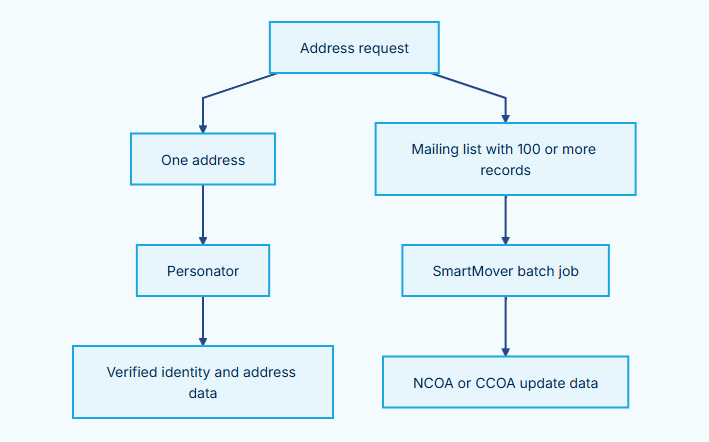
Diagram flow
Address request → One address
Address request → Mailing list with 100 or more records
One address → Personator
Personator → Verified identity and address data
Mailing list with 100 or more records → SmartMover batch job
SmartMover batch job → NCOA or CCOA update data
Compliance Requirements#
SmartMover data is licensed for mailing purposes only.
Do not use NCOA or CCOA data for:
Data analytics.
Research.
List brokering.
Consumer profiling.
Any purpose outside postal address maintenance.
Confirm that your intended use follows your USPS, Canada Post, and Melissa license agreements before you start a batch job.
Batch Processing#
SmartMover batch processing updates U.S. addresses with USPS NCOALink data and Canadian addresses with Canada Post CCOA data.
Note
Required Use Restriction: Use SmartMover only for mailing address maintenance. Do not use NCOA or CCOA data for analytics, research, list brokering, or consumer profiling.
Introduction#
SmartMover runs asynchronous Batch Apex jobs through MD_SmartMoverJobWSExt.
It sends mailing list records to Melissa SmartMover services, applies returned address updates, and creates tracking records.
US NCOA processing requires at least 100 unique names and addresses. Batches below 100 records receive CASS standardization only. They do not return NCOA move data.
Batch Job Flow#
This flow shows how SmartMover processes a mailing list batch.
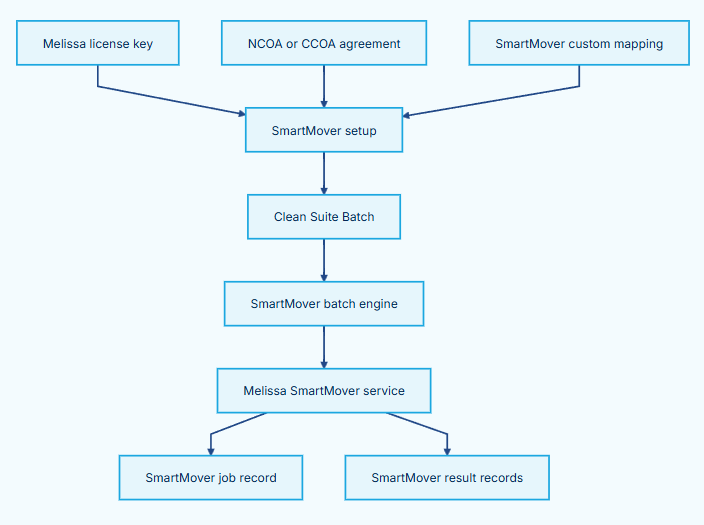
Diagram flow
Melissa license key → SmartMover setup
NCOA or CCOA agreement → SmartMover setup
SmartMover custom mapping → SmartMover setup
SmartMover setup → Clean Suite Batch
Clean Suite Batch → SmartMover batch engine
SmartMover batch engine → Melissa SmartMover service
Melissa SmartMover service → SmartMover job record
Melissa SmartMover service → SmartMover result records
SmartMover Batch Jobs Tab#
Use the SmartMover Batch Jobs tab to review and manage each submitted batch.
The tab lists MDPERSONATOR__SmartMoverJob__c records. Each job record includes:
Job Id.
List name.
Processing type (
NCOAorCCOA).Status.
Total record count.
Processed record count.
Error count.
USPS or Canada Post report links when available.
SmartMover Batch Records#
Clean Suite creates one MDPERSONATOR__MD_SmartMoverResult__c record for each source record that it processes.
Each result record contains input values, returned address values, and SmartMover codes. Use these records to audit the batch, review move results, and correct source field mappings.
How to use the Clean Suite Batch interface#
For the batch interface with screenshots of each step, see Clean Suite Batch Processing.
Complete the one-time setup steps before you start a job:
Add your Melissa license key in Admin Panel → License.
Open Admin Panel → SmartMover.
Select the NCOA Agreement checkbox for U.S. processing or CCOA Agreement checkbox for Canadian processing.
Set List Owner Frequency and Processing Type values.
Create a Custom Mapping for SmartMover US or SmartMover Canada.
Then start a batch job:
Open the Clean Suite Batch tab.
Select SmartMover US (
MD_SmartMoverBatch) or SmartMover Canada (MD_SmartMoverCABatch) as the engine.Select the target object and SmartMover mapping.
Enter a list name that identifies the mailing list.
(Optional) Enter a custom SOQL query to limit the mailing list.
Click Run Batch.
Monitor the job through the SmartMover Batch Jobs tab and Setup → Async Apex Jobs.
Advanced Batch Processing#
Exposed Methods#
Call MD_CleanSuiteBatchController.executeBatchJob to run SmartMover jobs from Apex.
public static Id executeBatchJob(
  String Engine,              // 'MD_SmartMoverBatch' or 'MD_SmartMoverCABatch'
  String BatchObject,         // Target object API name
  String Query,               // SOQL query string
  String Mapping,             // SmartMover Custom Mapping Name
  Boolean RecordUpdate,       // Ignored by SmartMover engine
  Boolean ProcessAll,         // Ignored by SmartMover engine
  Boolean CustomQuery,        // true for custom SOQL
  String SmartMoverListName,  // Mailing list name
  String SmartMoverJobId      // Optional job ID. Empty string creates one.
)
Sample Code#
// Start a U.S. NCOA SmartMover batch job
Id batchJobId = MDPERSONATOR.MD_CleanSuiteBatchController.executeBatchJob(
    'MD_SmartMoverBatch',
    'Contact',
    'SELECT Id FROM Contact WHERE MailingCountry = \'US\'',
    'Contact NCOA Mapping',
    true,
    false,
    true,
    '2026 Spring Direct Mail List',
    ''
);

System.debug('SmartMover Batch Job ID: ' + batchJobId);
Best Practices#
Confirm Minimum Record Count: Submit at least 100 unique names and addresses for U.S. NCOA move results.
Use Descriptive List Names: Include campaign, region, and date in list names for audit records.
Review Result Records: Check
MD_SmartMoverResult__cresults before you use updated addresses for a mailing.
Engineering Reference#
This reference documents the SmartMover Apex architecture, public batch interface, and data model.
Note
Required Use Restriction: SmartMover processes USPS NCOALink and Canada Post CCOA data for mailing purposes only.
Exposed Methods#
MD_CleanSuiteBatchController.executeBatchJob#
The controller routes SmartMover batch requests to MD_SmartMoverJobWSExt.
@AuraEnabled
public static Id executeBatchJob(
    String Engine,
    String BatchObject,
    String Query,
    String Mapping,
    Boolean RecordUpdate,
    Boolean ProcessAll,
    Boolean CustomQuery,
    String SmartMoverListName,
    String SmartMoverJobId
)
Valid SmartMover engine values:
MD_SmartMoverBatch: U.S. NCOA processing.MD_SmartMoverCABatch: Canadian CCOA processing.
MD_SmartMoverJobWSExt Constructor Constructor#
public MD_SmartMoverJobWSExt(
  String query,
  String mappingName,
  String jobId,
  String actionCode,
  String listName
)
Parameter |
Description |
|---|---|
|
SOQL query used to select target records. |
|
SmartMover Custom Mapping record Name. |
|
SmartMover tracking job identifier. |
|
|
|
Mailing list name stored on job record. |
SmartMover Batch Architecture#
This flow shows how SmartMover creates tracking and result data.
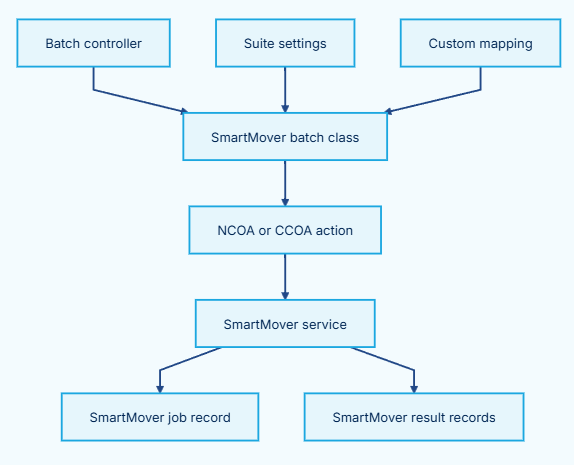
Diagram flow
Batch controller → SmartMover batch class
Suite settings → SmartMover batch class
Custom mapping → SmartMover batch class
SmartMover batch class → NCOA or CCOA action
NCOA or CCOA action → SmartMover service
SmartMover service → SmartMover job record
SmartMover service → SmartMover result records
Data Model#
Object |
Purpose |
|---|---|
|
Stores one tracking record for each batch job. |
|
Stores one processing result for each source record. |
|
Stores SmartMover input and output mapping JSON. |
|
Stores license key and NCOA/CCOA processing settings. |
Sample Code#
Start an NCOA Job#
String query = 'SELECT Id FROM Contact WHERE MailingCountry = \'US\'';
String mappingName = 'Contact NCOA Mapping';
String generatedJobId = 'NCOA-' + String.valueOf(Datetime.now().getTime());

MDPERSONATOR.MD_SmartMoverJobWSExt batch = new MDPERSONATOR.MD_SmartMoverJobWSExt(
    query,
    mappingName,
    generatedJobId,
    'NCOA',
    'Spring Mailing 2026'
);

Id asyncJobId = Database.executeBatch(batch, 100);
System.debug('Started SmartMover job: ' + asyncJobId);
Best Practices#
Use the Controller for UI Integrations: Use
executeBatchJobwhen Lightning components start SmartMover jobs.Do Not Reduce Batch Size: Run batch chunks at 100 records. The SmartMover engine expects this size.
Save Job IDs: Keep
SmartMoverJobIdvalues for tracking and troubleshooting each mailing list submission.
API Reference Guide#
This guide describes the Melissa SmartMover API endpoints and data returned by Clean Suite batch jobs.
Note
Required Use Restriction: Use NCOA and CCOA data only for mailing address maintenance.
Web Service Endpoints#
Service |
Base URL |
Use |
|---|---|---|
SmartMover US |
|
USPS NCOALink processing. |
SmartMover Canada |
|
Canada Post CCOA processing. |
Supported Methods:
POSTResponse Format:
JSONMinimum U.S. NCOA Records: 100 unique names and addresses.
API Request and Response Flow#
This flow shows the batch request and JSON response path.
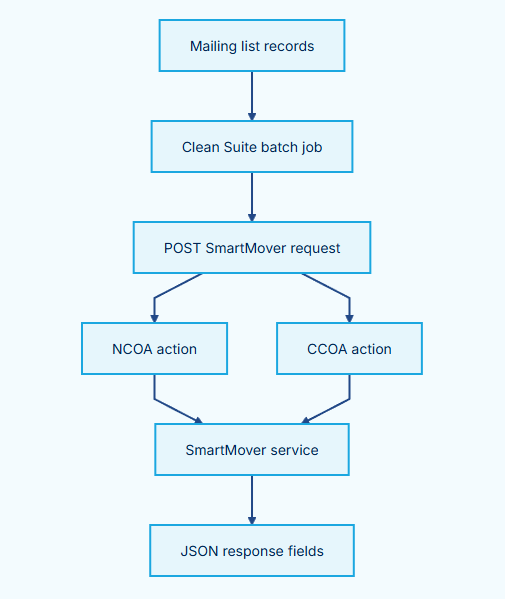
Diagram flow
Mailing list records → Clean Suite batch job
Clean Suite batch job → POST SmartMover request
POST SmartMover request → NCOA action
POST SmartMover request → CCOA action
NCOA action → SmartMover service
CCOA action → SmartMover service
SmartMover service → JSON response fields
Input Request Parameters#
Parameter |
Type |
Description |
|---|---|---|
|
String |
Melissa Customer ID license key. Required. |
|
String |
Processing option string. |
|
String |
Unique SmartMover job identifier. |
|
String |
Mailing list name. |
|
String |
Full name of recipient. |
|
String |
Street address. |
|
String |
Unit or suite number. |
|
String |
City or locality. |
|
String |
State or province. |
|
String |
ZIP code or Canadian postal code. |
Note: The action parameter (NCOA for United States or CCOA for Canada) is determined automatically by the batch engine you select.
When you select SmartMover US (MD_SmartMoverBatch), the package sets action to NCOA. When you select SmartMover Canada (MD_SmartMoverCABatch),
it sets action to CCOA. You do not specify this parameter directly.
Output Response Fields#
Field Name |
Type |
Description |
|---|---|---|
|
String |
Source record identifier. |
|
String |
Comma-separated SmartMover status codes. |
|
String |
Updated standardized street address. |
|
String |
Updated secondary address line. |
|
String |
Updated city. |
|
String |
Updated state or province. |
|
String |
Updated ZIP code or postal code. |
|
String |
Move type classification. |
|
String |
Reported move date. |
|
String |
USPS carrier route. |
|
String |
USPS or Canada Post processing report link. |
Common Result Codes#
SmartMover returns the following result code families.
Result Code |
Meaning |
Category |
|---|---|---|
|
Move with New Address |
Success |
|
Standardized Address |
Success |
|
Move Input Requirements not Satisfied |
Informational |
|
Move but No New Address |
Informational |
|
Individual Move |
Informational |
|
Family Move |
Informational |
|
Business Move |
Informational |
|
Daily Delete |
Informational |
|
SmartMover Match Status codes |
Various |
|
Address Change, Error, and Status codes |
Shared families |
Result Codes#
SmartMover returns the following record-level result code families. SmartMover can also return the shared Address Change (AC), Address Error (AE), and Address Status (AS) code families.
For all SmartMover result codes, see Result Codes - SmartMover.
For the complete result-code reference, roadmap, and result-code routing guidance, see Result Codes.
BusinessCoder US#
BusinessCoder US uses a businessCoder custom mapping to process a Salesforce record.
API Reference#
ItemPackage behavior |
|
|---|---|
Named Credential |
|
Endpoint |
|
Method |
|
Headers |
|
Request limit |
|
The request body contains t: ListwareForSalesforce, id from MD_suiteSetting__c.customerId__c, opt: '', a fixed cols value, and Records.
The mapped processing request sends these fields for each record:
Payload field |
Request field |
|---|---|
|
|
|
|
|
|
|
|
|
|
|
|
|
|
|
|
|
|
The Aura callable method maps only company, addressLine1, city, state, postalCode, country, ticker, and web from the source record.
It does not map a phone value for that path.
The package requests these columns: LocationType, Phone, EmployeesEstimate, SalesEstimate, StockTicker, WebAddress,
GrpAddressDetails, GrpBusinessCodes, GrpBusinessDescription, GrpGeoCode, and GrpCensus.
The general doProcess path also requests Contacts.
Response and Mapping Contract#
The package stores these response values in MD_businessCoderResult__c. A businessCoder output map can write selected values to the source record.
Response field group |
Stored fields |
|---|---|
Identity and result |
|
Address |
|
Business |
|
Industry |
|
Location and census |
|
Melissa keys |
|
The response type also parses TotalContacts, TotalSuggestions, Contacts, and Suggestions.
The output-map update path does not map those values to the source record.
Output-map key |
Stored response field |
|---|---|
|
Result record Id |
|
|
|
|
|
Corresponding address fields |
|
Corresponding business fields |
|
|
|
|
|
|
|
|
|
Corresponding census fields |
|
Corresponding identity fields |
|
Corresponding location and business fields |
|
Corresponding geocode fields |
|
Corresponding Melissa key fields |
|
Corresponding address fields |
The package response type has no email, franchise, or Fortune indicator fields. Do not map or describe those values as BusinessCoder output.
Engineering Reference#
Method |
Visibility and return Behavior |
Description |
|---|---|---|
|
|
Processes every |
|
|
Calls |
|
|
Sends the request records and adds the mapping name to each response. |
|
|
Stores responses in |
Single Record Processing#
The quick action CS_BusinessCoderAction calls doBusinessCoder during initialization.
Open a record that has a
businessCodermapping.Select Verify Business.
Wait for the quick action to close.
Read the confirmation message that appears at the top of the page.
Review the refreshed record.
The action runs immediately. It writes configured output-map values and stores the response. It closes the quick action, shows a success or failure confirmation message, and refreshes the record view. No review dialog or manual record save occurs.
Batch Processing#
The installed package has no MD_BusinessCoderBatch class and no BusinessCoder batch engine.
Do not configure the Clean Suite batch interface for BusinessCoder US.
You can call doProcess from custom Apex only when your implementation supplies MD_BusinessCoderRequest records and manages Salesforce callout limits.
Apex Invocation#
String status = MDPERSONATOR.MD_BusinessWSExt.doBusinessCoder(recordId);
The method returns a package status string. Read MD_businessCoderResult__c.Results__c or mapped output fields for service results.
Administrator Options#
Clean Suite administrators can configure one option in Salesforce Setup to control BusinessCoder US behavior.
Option |
API Field |
Allowed Values |
Default |
Effect |
|---|---|---|---|---|
Return Dominant Business |
|
yes, no |
yes |
When yes, returns the single dominant business classification per record. When no, returns all matching classifications. |
Result Codes#
BusinessCoder US can return the shared Address Error, Address Status, Append Results, Geocode Error, Geocode Status, Phone Error, and Phone Status code families. It also returns these record-level code families.
For all BusinessCoder result codes, see BusinessCoder-ResultCodesFull.
For the complete result-code reference, roadmap, and result-code routing guidance, see Result Codes